

If you’ve ever created a budget with the best intentions… only to abandon it halfway through the month, you’re not alone. I’ve tried budgeting apps, notebooks, and complicated spreadsheets that promised financial clarity but delivered overwhelm instead.
That’s exactly why I was curious to try this Personal Budget Planner Google Sheets. I wanted something simple, flexible, and realistic — not another system that felt like a second job.
After spending time with it, here’s my honest experience.
First Impressions: Clean, Calm, and Surprisingly Intuitive
Right away, what stood out to me was how clean and uncluttered the planner felt. This isn’t one of those intimidating spreadsheets packed with endless tabs and confusing formulas. Everything is clearly laid out, and it runs entirely in Google Sheets, which I already use regularly.
The setup was refreshingly straightforward:
- You enter your income
- List your expenses and categories
- Let the planner do the math
No complex formulas to touch, no steep learning curve. It felt approachable — which, in my experience, is half the battle when it comes to budgeting.
How I Actually Used It
To really test it, I used the planner during a month that wasn’t financially “perfect.” My income came in at different times, I had a few unexpected expenses, and I still wanted to save something.
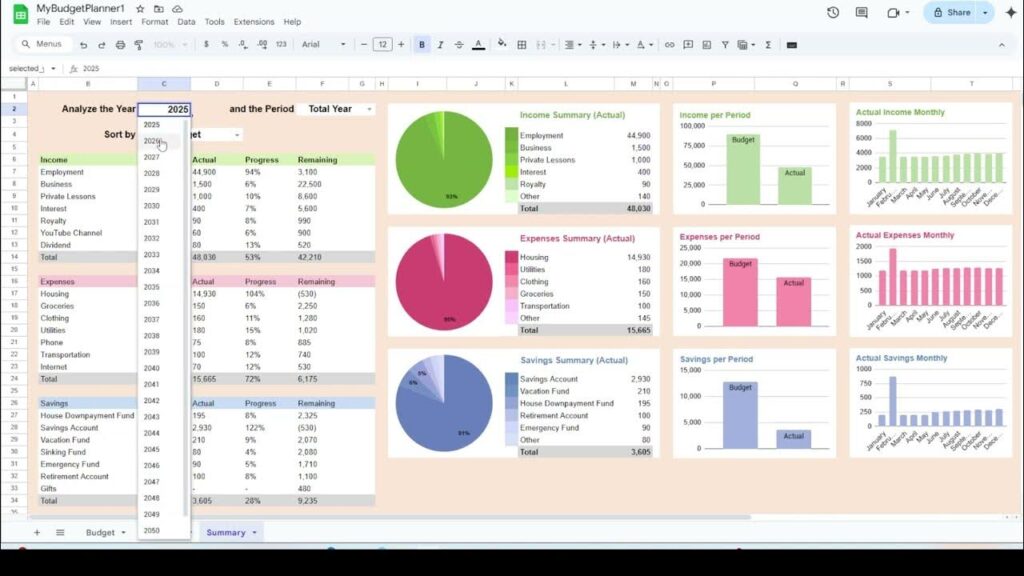
This is where the Smart Income Allocation feature really helped. Instead of guessing how much I could spend, the planner automatically showed me how my income was being distributed across expenses, savings, and discretionary spending.
What I loved most was the summary dashboard. One quick glance told me:
- Where my money was going
- Which categories were creeping up
- Whether I was on track or overspending
Seeing everything visually made it much easier to adjust before things got out of hand. Instead of feeling guilty about spending, I felt informed — and that’s a big difference.
What Makes This Budget Planner Stand Out
Here are a few things that genuinely impressed me:
1. It Encourages Consistency
Because it’s easy to use, I actually stuck with it. I didn’t feel resistance opening it up every few days, which is something I can’t say about most budgeting tools I’ve tried.
2. Full Control Over Your Data
This is your spreadsheet. You’re not locked into an app, and there’s no subscription. You can customize categories, duplicate months, or tweak things as your financial life changes.
3. Long-Term Tracking
The planner keeps your monthly and yearly history, which is incredibly helpful for spotting patterns. After a while, you can clearly see trends — seasonal expenses, spending habits, or progress with savings.
4. One-Time Purchase
At $39.99, it’s a one-time investment. No monthly fees quietly draining your account, which already feels like a win for a budgeting tool. Check it out here.
A Few Things to Keep in Mind
To keep this review honest, here are a couple of things worth noting:
- You’ll need to manually enter your numbers (this isn’t a bank-synced app). Personally, I like this because it keeps me aware of my spending, but it may not be for everyone.
- It works best if you’re at least somewhat comfortable with Google Sheets. You don’t need to be an expert — just willing to type numbers into cells.
How the Google Sheets Personal Budget Planner Compares to Popular Budgeting Apps
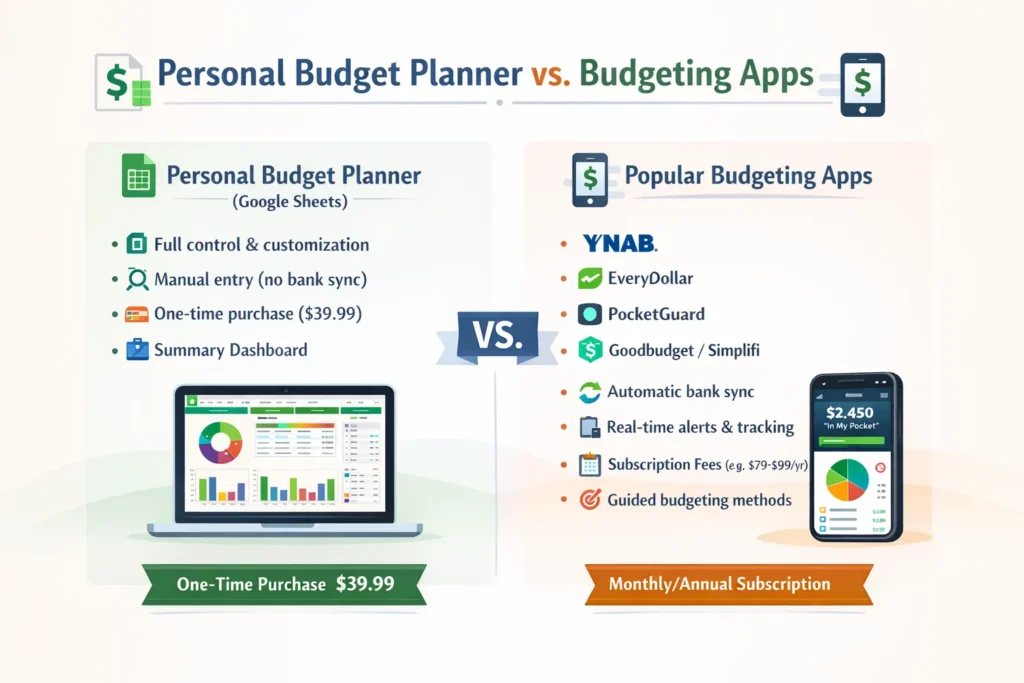
In case you’re curious how the Personal Budget Planner stacks up against mainstream budgeting apps, here’s a helpful comparison section you can drop right into your blog post. It highlights key differences so your readers can decide what tool fits their style of budgeting best.

🧠 At a Glance: Planner vs. Apps
| Tool | Best For | Bank Sync | Cost | Manual Entry Needed | Standout Feature |
| Personal Budget Planner (Google Sheets) | Budgeters who like control & customization | ❌ No | One-time purchase (~$39.99) | 🟢 Yes | Full control, transparency, summary dashboard |
| YNAB (You Need A Budget) | Zero-based budgeting pros | ✔️ Yes | Subscription (~$99/yr) | ⚪ Some | Guides disciplined budgeting & goals 💡 (MoneyMendorHQ) |
| EveryDollar | Beginners & zero-based budgeting | ✔️ (Premium) | Free basic / ~$79/yr premium | ⚪ Some | Simple zero-based system ✨ (Forbes) |
| PocketGuard | Quick spendable amount tracking | ✔️ Yes | Free / ~$75/yr | ⚪ Some | “In My Pocket” safe-to-spend feature 📱 (MyFiLi) |
| Goodbudget | Envelope budgeting method & sharing | ❌ Manual in free | Free / ~$70/yr | 🟢 Yes | Envelope budgeting system 💼 (NerdWallet) |
| Simplifi by Quicken | Auto-setup + real-time tracking | ✔️ Yes | ~$36-$72/yr | ⚪ Some | Automatic budgeting & cash-flow insights 📊 (Ramsey Solutions) |
💡 What This Means for You
📌 Personal Budget Planner (Google Sheets)
- Great for budgeters who want full visibility and control over their money.
- Perfect if you like working with spreadsheets and enjoy customizing your system.
- Because it’s not tied to your bank data, you won’t get live syncing, but that also means fewer privacy concerns and no ongoing subscription.
📱 Budgeting Apps
- YNAB helps you assign every dollar a job and change your habits — ideal for people focused on goals and discipline. (MoneyMendorHQ)
- EveryDollar brings a structured zero-based approach with optional bank sync. (Forbes)
- PocketGuard simplifies ongoing tracking with a “safe-to-spend” focus — handy if you want a quick snapshot. (MyFiLi)
- Goodbudget sticks to classic envelope budgeting — manual but excellent for couples or families sharing finances. (NerdWallet)
- Simplifi leans toward hands-off automation with automatic categorization and real-time insights. (Ramsey Solutions)
👀 When to Pick What
✨ Choose Personal Budget Planner if you:
- Enjoy a hands-on, flexible budgeting tool
- Want privacy and control without bank integration
- Prefer a one-time purchase over monthly/annual fees
📲 Choose a Budgeting App if you:
- Want automatic bank syncing and real-time tracking
- Prefer mobile alerts and live transaction tracking
- Like guided budgeting methods (like zero-based budgeting)
🧠 Bottom Line
There isn’t a one-size-fits-all budgeting tool — it depends on your style:
- If you love designing your own system and want full transparency, the Personal Budget Planner hits the sweet spot.
If you want automation and convenience with bank sync and habit reinforcement, apps like YNAB, PocketGuard, or EveryDollar might be a better fit.
Who I Think This Is Perfect For
You’ll probably love the Personal Budget Planner if:
- You prefer spreadsheets over mobile apps
- You want a simple, visual way to understand your money
- You value flexibility and ownership of your financial data
- You’re tired of subscriptions and want a one-time solution
If you’re looking for something that automates everything with zero input, this may not be the right fit. But if you want clarity, control, and a system that actually feels doable, this planner hits a sweet spot.
Final Thoughts
Budgeting doesn’t have to be complicated or stressful. What I appreciated most about the Personal Budget Planner is that it feels realistic. It works with real life — variable income, unexpected expenses, and changing priorities.
Instead of making me feel bad about my finances, it helped me feel more confident and in control. And honestly, that’s the kind of tool that’s worth investing in.
If you’re ready to take a calmer, more intentional approach to your money, this planner is definitely worth checking out.
FAQs on Personal Budget Planner in Google Sheets
Is a budget planner better than budgeting apps?
A budget planner can be better than budgeting apps for users who want more control, customization, and lower long-term costs. Budgeting apps offer automation and convenience, while planners encourage awareness and intentional spending.
Can I budget effectively without bank syncing?
Yes. Many people budget effectively without bank syncing by manually tracking expenses. Manual entry often increases awareness and helps users stay consistent with spending habits.
What is the best budgeting tool for beginners?
The best budgeting tool for beginners depends on preference. Beginners who want automation may prefer budgeting apps, while those who value simplicity, flexibility, and one-time cost may prefer a Google Sheets budget planner.